
3D Software Renderer
This is an experimental Java project I built to learn the fundamentals of 3D rendering from the ground up. It is implemented in Java using AWT (Graphics2D) and runs entirely as a CPU-based software renderer. Performance was not the main goal, so I intentionally avoided large frameworks like OpenGL. Instead, I used Java AWT because I already had experience with it and it made it easy to render 2D primitives while I implemented the full 3D projection and rendering pipeline myself to better understand the underlying theory.
Vertex Transformation Pipeline
Internally, the world is represented as simple 3D vectors, meaning every point has an x, y, and z coordinate. All geometry is built from triangles because triangles are straightforward to project and rasterize, and any complex shape can be represented as a set of triangles.

A 3D object such as a cube is composed of multiple triangles arranged into the correct shape. Light sources are represented as vectors as well, with additional information such as color and intensity. Each object has a base color, and lighting is applied on top by computing additional color contributions from all light sources. The player controller is represented by a 3D position vector plus yaw and pitch values that define the camera orientation.
Rendering
I initially implemented the rendering pipeline using the painter’s algorithm because it is simple and easy to reason about. Triangles are drawn in order by distance, with the farthest geometry rendered first and the closest geometry rendered last, so nearer triangles naturally overwrite farther ones. The downside of this approach is that it can produce artifacts when objects intersect or when triangle distance is ambiguous due to size or overlap. The image below shows cases where geometry is drawn over other geometry even though it should not be.
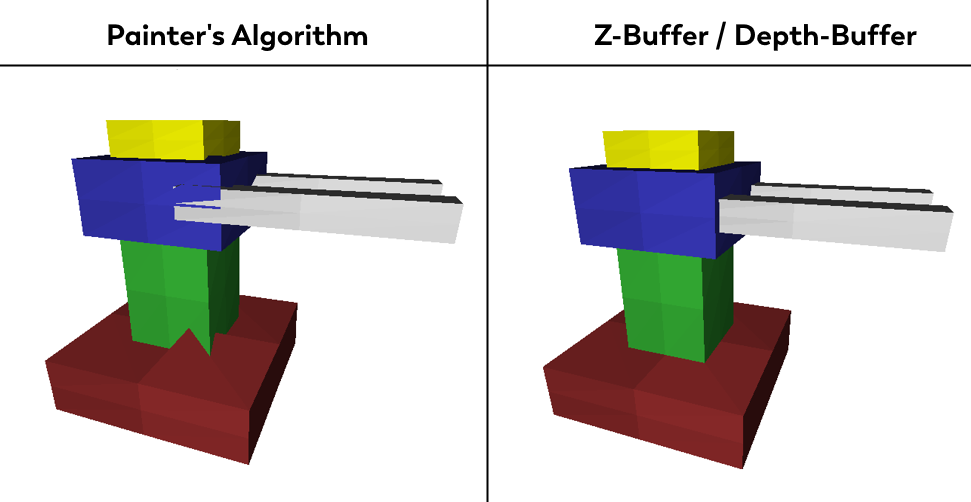
To address this, I implemented a depth buffer (z-buffer). Instead of sorting entire triangles, visibility is resolved per pixel by storing the closest depth value for each screen coordinate. This produces correct results even for intersecting geometry, but it is significantly more computationally expensive.
In the same scene, the painter’s algorithm reached about 1600 frames per second, while the depth buffer approach reached about 190 frames per second.
Shading
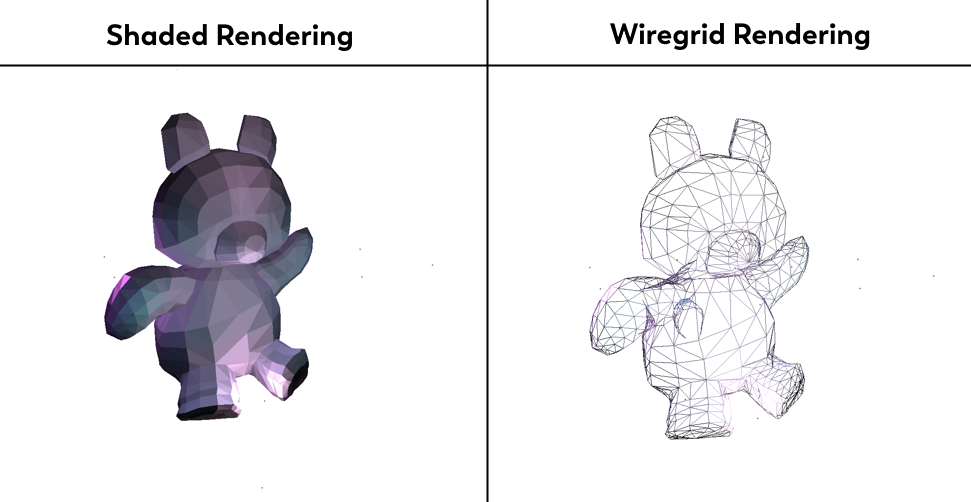
For development and debugging, I implemented a wireframe mode that renders only the edges of each triangle. This makes it easy to see the triangle structure of meshes and helps when evaluating optimization steps. Shaded rendering fills triangles using their computed color.
Optimization
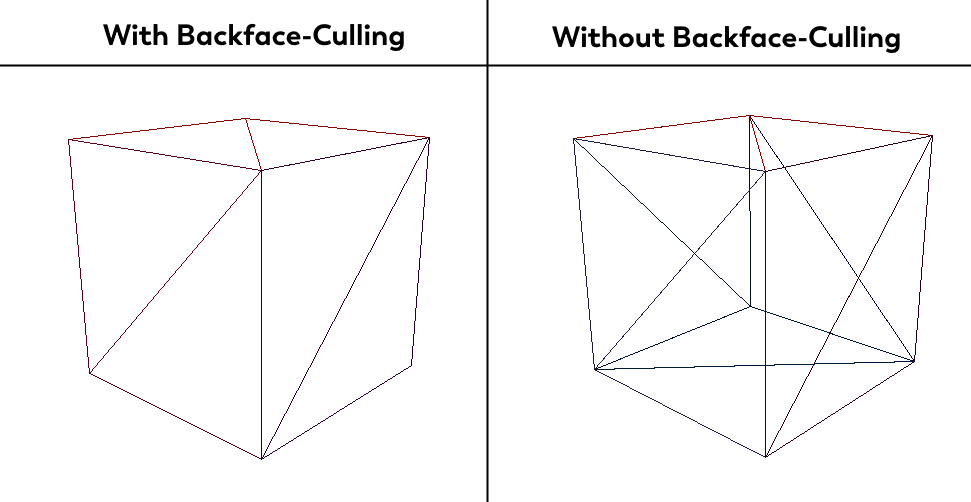
A key optimization I implemented is backface culling. Triangles facing away from the camera are skipped because they represent the backside of closed meshes and do not contribute to the final image in a solid render. In wireframe mode this makes a large difference, because without culling the edges on the far side of an object are still drawn even though they would not be visible in shaded mode.
Lighting
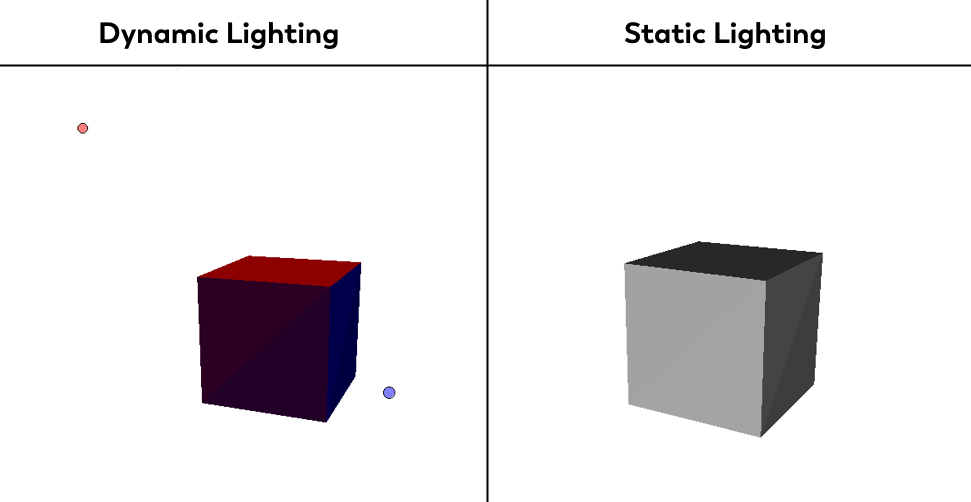
The project supports both static and dynamic lighting. Static lighting uses only the object’s base color, while dynamic lighting computes lighting in real time based on available light sources.
Dynamic Lighting
Dynamic lighting supports moving objects and moving lights because the lighting is recalculated every frame. In the video below, the dot represents the light source.
Static Lighting
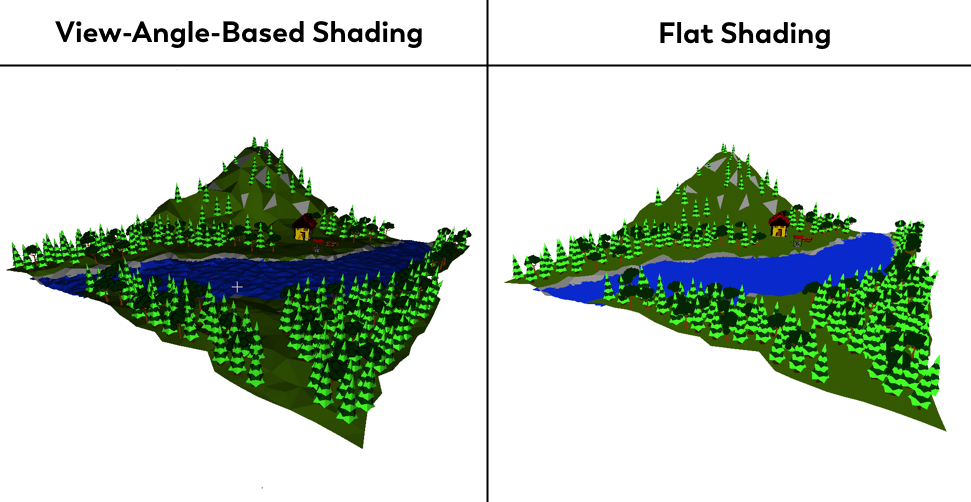
For static lighting I also added a simple view-dependent shading variation to slightly brighten or darken surfaces based on the camera viewing angle. This is not physically accurate lighting, but it helps reduce the flat look that occurs when large surfaces share the exact same base color by adding a subtle perception of depth.
Data Model
To support real assets, I added an importer for the Wavefront format (.obj) with .mtl support. This is also how the environment in the view-dependent shading screenshot was loaded. I did not model that map myself, but imported an existing .obj from an online source.
For example, this is a mesh for a single triangle in Wavefront format:
v 0.0 0.0 0.0
v 1.0 0.0 0.0
v 0.0 1.0 0.0
f 1 2 3